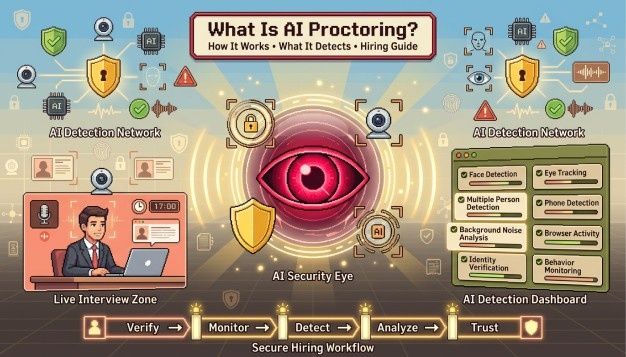
Remote assessments created a monitoring gap. When hiring moved online en masse, the proctor didn't come with it. AI proctoring for hiring fills that gap by using facial detection, gaze tracking, audio analysis, and browser monitoring to identify behaviour that may compromise assessment integrity.
What Is AI Proctoring?
AI Proctoring assists hiring teams using artificial intelligence to identify any cheating by watching candidates via facial recognition, gaze tracking, audio detection, and browser activity throughout the entire remote testing period.
The need for proctoring existed long before digital technology. Physical proctoring has been there ever since competitive testing came into existence. The only thing that has happened is that remote testing assessments have grown and humans cannot scale along with it.
The software picks up any incidents intuitively like gaze shift from the candidate, background noise or any browser activity and saves it in a time-stamped report.
Recruiters receive a violation report rather than hours of raw footage. Flagged events include timestamps, severity ratings, and the relevant clip or screenshot. A recruiter reviewing 200 assessments spends time on the sessions that need attention instead of watching 200 recordings from start to finish.
The rules governing assessment tests in hiring are completely different from those in academia and certification. Candidates are free to quit the process at any time; therefore, false positives directly influence the candidate drop rate. Most of the proctoring software used in hiring takes that into account and is configured with that trade-off in mind.
Why Are Hiring Teams Using AI Proctoring Now?
Companies use AI exam proctoring to maintain assessment integrity and ensure every candidate competes under identical conditions.
The scale of the issue evolved much faster than most hiring teams anticipated it to. In a survey by Resume Builder, 45% of respondents said they exaggerated their skills with AI tools during the hiring process: 32% lied about skills on their resumes, and a further 30% more lied during the interview process.
Test Partnership (2025), citing AssessmentDay's 2024 "Using AI in Online Assessments" survey of 1,282 job applicants, found that 83% of candidates would use generative AI during an assessment if they believed employers would not detect it, while 14% admitted to already doing so.
By February 2026, CodeSignal documented that cheating on technical hiring assessments had doubled in a single year, from 16% to 35% of test-takers. HirePro's analysis of platform data across entry-level assessments put the figure between 30% and 50%. Both data points predate the next wave of stealth AI tools that run outside browser proctoring detection entirely.
The bigger challenge is score reliability. When some candidates complete assessments with AI assistance or external help, while others don't, identical scores stop meaning the same thing, which is why maintaining interview integrity has become a priority for hiring teams. A 2025 survey found that 59% of hiring managers suspected candidates of faking abilities with AI during live assessments, while only 38% had structured proctoring in place. Running remote assessment monitoring for some candidates and unmonitored ones for others makes meaningful comparison much harder.
Proctoring software services have been estimated to have attained a valuation of around $869 million in the global market in 2024 (The Insight Partners), with an expected market valuation of $2.35 billion in 2031, with increasing contributions from corporate hiring, along with academic applications. Software firms such as Mercer Mettl, HackerRank, and Hyring have adopted proctoring tools as part of their assessment tools.
How Does AI Proctoring Work?
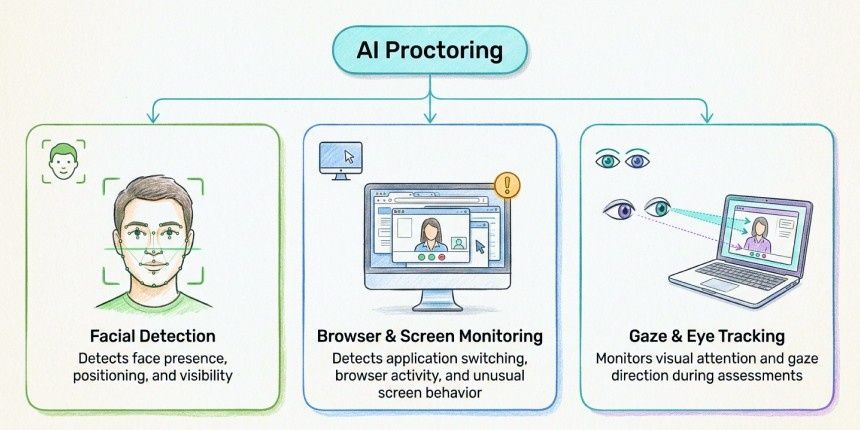
AI proctoring combines several monitoring systems that run throughout an assessment. Some verify identity, others monitor candidate behaviour, while the browser layer records activity inside the assessment environment. Together, these signals help recruiters review assessments more efficiently.
How Facial Detection and Identity Verification Work
AI invigilation for recruitment begins before the assessment starts. The applicant needs to keep their government-issued identity card in front of the webcam, after which the image is compared using AI facial recognition technology. Proxy candidates, a major concern in technical recruitment these days, are easily identified here.
The facial detection model continues running throughout the assessment, checking whether the candidate remains visible and whether the detected face still matches the verified identity. If another person enters the frame, the event is logged separately from face-absence alerts. Platforms, including Mercer Mettl's AutoProctor and Hyring, both distinguish between these events because recruiters interpret them differently.
Detection accuracy still depends on model quality. Lighting conditions, camera quality, and training data all influence false-positive rates, making it worth asking vendors how their models perform across different environments.
How Gaze and Eye Movement Tracking Work
Software-based gaze estimation is not the same as UX eye-tracking. It doesn't identify what candidates are reading; it simply detects whether their attention repeatedly shifts away from the screen. Looking away once or twice is normal. Repeated, prolonged gaze deviation creates a pattern that recruiters may want to review.
Every gaze alert includes a supporting video clip. Context matters. A candidate checking a phone repeatedly is very different from someone briefly looking away while thinking through a difficult problem.
How Audio Monitoring Works in AI Proctoring
Audio monitoring listens for sounds that may affect assessment integrity, particularly additional voices that could indicate outside assistance. More advanced systems can distinguish among multiple speakers rather than simply detecting background noise.
Audio is also the signal most likely to produce false positives. A television, a family member in another room, or a phone notification can all trigger alerts if thresholds are set too aggressively.
How Browser and Screen Monitoring Work
Browser monitoring focuses on activity inside the assessment environment. It records events such as tab switching, window focus changes, clipboard activity, browser lockdown bypass attempts, and, on some platforms, screen-sharing.
These events are easier to verify than gaze or audio alerts because they're recorded directly.
Also Read: Video Proctoring in 2026: Securing the Integrity of Remote Assessments | Hyring Blogs
What Does AI Proctoring Actually Detect?
Understanding how AI proctoring works is one part of the picture. Recruiters don't review raw facial detection data, gaze calculations, or audio models. What they see are alerts generated from those systems.
Most proctoring reports group alerts into a few common categories so recruiters can quickly understand what happened during a session.
Physical Presence Alerts
Physical presence alerts originate from the webcam and identity verification systems. Common examples include the candidate leaving the frame, multiple people appearing on camera, deliberate camera obstruction, or an identity mismatch during verification. These alerts are usually the easiest to interpret because recruiters can quickly compare the flagged event with the supporting video.
Behavioral Alerts
Behavioural alerts come from gaze tracking and audio monitoring. Repeated gaze deviation, prolonged off-screen attention, or secondary voices may all trigger review. These alerts require context because the same behaviour can have multiple explanations, which is why recruiters review the supporting clip before making a decision.
Digital Activity Alerts
Digital activity alerts come from browser and system monitoring. Tab switching, clipboard activity, browser lockdown bypass attempts, and screen-sharing are all recorded directly, making these alerts easier to verify than audio or gaze-related events.
Recruiters work through the queue with all three categories visible. Sessions with flags clustered across multiple categories during the same time window are a different read from sessions with isolated, low-severity events in a single category.
Live vs. Automated Proctoring: Which One Is Right for Hiring?
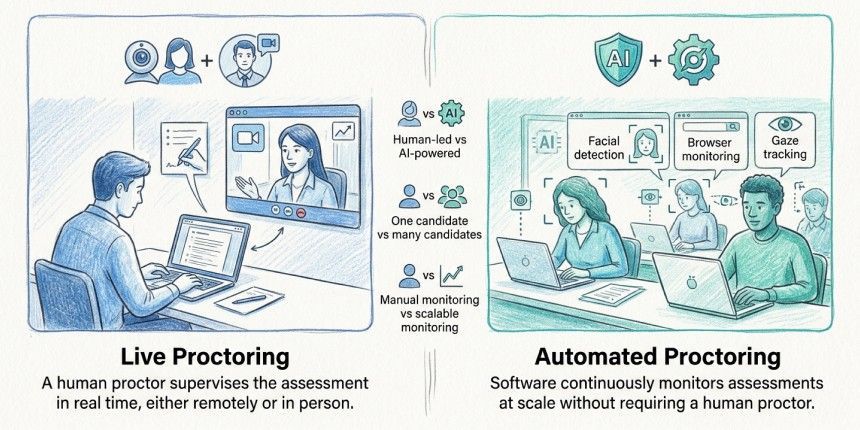
Which one is right depends on the user case scenario of the company deploying the respective proctoring. The basic difference is that automated proctoring scales to high-volume hiring, whilst live proctoring provides real-time human intervention for critical or final-round assessments.
Most hiring teams aren't choosing between live and automated online assessment proctoring because one is more secure than the other. They're usually deciding how much manual oversight they can realistically support at their hiring volume.
Automated proctoring runs without a human monitor during the session. The AI watches the full assessment, builds the flag log, and delivers the violation report after the candidate finishes. A recruiter reviews flagged sessions after this, not in real time.
Live proctoring consists of a human proctor for each session, typically via video conference. They observe in real-time and can issue warnings or end a session if an incident warrants the same. It mimics the exam room experience that has invigilation going on. The costs increase directly with the candidate volume if you were to have a minimum of one proctor for every single session, which ultimately becomes prohibitive quickly.
Automated proctoring is usually the better choice for graduate hiring, large-scale technical assessments, and any process involving hundreds of candidates. Live proctoring is more suitable for smaller, high-stakes assessments where immediate intervention or direct observation adds value.
Most hiring teams end up somewhere between the two approaches. Automated proctoring handles routine remote assessment monitoring, while recruiters step in only when flagged sessions require additional review.
How Do You Set Up AI Proctoring for Hiring?
Most implementation problems appear before the first candidate even starts the interview. Technology is usually the easy part. The difficult part is deciding how alerts will be handled, how candidates will be informed, and how strict the monitoring should be for a particular hiring process.
Sensitivity settings should match the assessment, not personal preference. A timed cognitive test completed in a controlled environment may justify stricter thresholds than a take-home writing exercise where reference material is expected.
Recruiters should also decide in advance how flagged sessions will be reviewed, who owns the review queue, and what requires escalation. Clear guidelines reduce inconsistency once assessments begin and improve assessment integrity.
Tell Candidates What to Expect
There is a reasonable expectation of privacy that candidates have when they are being evaluated from their own homes. Any mid-process proctoring that happens without informing the candidate in advance damages the experience and creates legal exposure depending on the jurisdiction.
The GDPR Privacy Law by the EU requires explicit disclosure of what data is collected, how it's processed, who reviews it, and retention periods. The CCPA law applies only to people residing in California. BIPA of Illinois is the most heavily litigated biometric information privacy law in the United States; facial recognition technology creates biometrics, and the BIPA law applies to any individual seeking employment in Illinois, irrespective of the location of the employing firm.
Candidates generally respond better when proctoring is explained as a fairness measure rather than an unexplained surveillance step. A short explanation in the assessment invitation usually prevents confusion and improves trust.
Readiness Check Before Session Begins
Many false positives originate from technical issues rather than candidate behaviour. Checking webcam, microphone, browser, and operating system compatibility before the assessment begins prevents unnecessary flags and reduces manual review later.
How Does Hyring's Proctoring Work During Hiring Assessments?
Proctoring is integrated right into Hyring's assessment process, allowing recruiters to review flagged events alongside candidate scores and responses in a single interface.
It becomes an integral part of the AI Interviewer itself, rather than existing as a separate product layer.
When a recruiter sets up an interview, whether it's a cognitive test, a structured video response, or a technical challenge, the proctoring settings appear in the same workflow. There's no separate dashboard to configure or third-party integration to maintain.
During the assessment, Hyring records the candidate's webcam, microphone, browser activity, and screen while identity verification is completed before the first question appears. Once the assessment ends, the recorded session is analysed for events such as multiple faces in frame, prolonged gaze deviation, background voices, browser activity, and other potential integrity violations. Recruiters don't need to monitor sessions live or manually review every recording.
After the candidate completes the interview, the violation report appears alongside their score and any video responses in the candidate profile. Recruiters move through the flag queue rather than watching entire recordings. Individual clips linked to each violation, together with the full session recording, remain available whenever additional context is required. In practice, a recruiter reviewing a shortlist of 40 candidates can work through flagged events far more efficiently than switching between separate score sheets, proctoring dashboards, and video players.
Sensitivity settings can be adjusted at each level. A recruiter conducting volume hiring where many candidates are completing assessments from shared apartments or family homes may lower audio and gaze sensitivity to reduce unnecessary household-noise flags. The same recruiter can apply stricter thresholds for a final-round assessment for a senior technical role.
Candidates encounter proctoring as a brief readiness check before the session opens. Webcam, microphone, browser, and system compatibility are verified in the browser itself, with no extra ATS software to download. Keeping the experience browser-native reduces friction and helps minimise candidate drop-off during the assessment entry process.
Key Takeaways
AI proctoring helps recruiters review assessment integrity at a scale that would be difficult to manage manually. As the use of generative AI in hiring continues to grow, maintaining consistent assessment conditions has become just as important as evaluating candidate performance.
The technology is only as effective as its configuration. Clear policies, sensible thresholds, candidate communication, and human review all play a role in producing reliable outcomes.
For most hiring teams, automated proctoring offers the right balance between scale and oversight. Live monitoring still has a place for a small number of high-stakes assessments where immediate intervention adds value.
Frequently Asked Questions
1. Is AI proctoring legal for hiring?
AI proctoring is legal in most jurisdictions, so long as candidates have been forewarned about the test in advance and the company adheres to relevant privacy laws. Under the GDPR in Europe, the employer must inform the candidate about the data collected, its processing method, access, and retention period. Relevant laws in the US include the CCPA and the Illinois BIPA. India has its own equivalent in the form of the DPDP Act. Disclosure before the assessment must be an essential part of the procedure.
2. Can AI proctoring produce false positives?
AI Proctoring often leads to false positives. Looking away while thinking, background conversations, poor lighting, or unstable internet connections can all trigger alerts without any actual misconduct. That's why recruiters review flagged sessions rather than relying on the AI alone. According to HirePro's platform analysis, combining video, audio, and image proctoring detected around 98% of cheating incidents, but sensible configuration and human review remain essential.
3. Does AI proctoring record the full session?
Yes, the sessions are normally recorded in their entirety unless there are some special provisions due to restrictions of the subscription and/or technical issues. The violation report displays the video clip of the session that was flagged, while the recording of the whole session is saved in order to provide the recruiter with additional details of the case. The period for which the recordings should be stored varies from one platform to another, depending on the data processing agreement that you have with the vendor.
4. What's the difference between browser lockdown and full AI proctoring?
Browser lockdown prevents candidates from switching tabs or leaving the assessment environment. Full AI proctoring builds on that by adding webcam, audio, and behavioural monitoring. Some organisations use lockdown on its own for lower-risk assessments, while higher-stakes hiring typically combines both approaches.
5. How do candidates typically respond to being proctored?
Completion rates drop slightly when candidates are informed, which research suggests is partly a filtering effect rather than purely a friction problem. Candidates who intend to use external resources are more likely to abandon the exercise at the disclosure step. This loss can be easily managed through effective communication by making the candidates aware of what is being monitored and why. In other words, it is better to disclose the use of proctoring in plain terms than in legalistic jargon without any explanation.
6. Does Hyring require candidates to install additional ATS software to enable proctoring?
No. Hyring's proctoring runs directly in the browser. Candidates complete a short readiness check to confirm webcam, microphone, and browser compatibility before the assessment begins, with no software or browser extensions required. Hyring has its own proprietary software which can also be used on desktop computers.
7. What happens when a candidate's session is flagged?
The flagged session appears in the recruiter's review queue with timestamps, severity ratings, and supporting clips. The recruiter reviews those events in context before deciding whether any action is required. AI provides the evidence; the hiring decision still belongs to the recruiter.