
Employee monitoring software cost in 2027 can be one of two options: a fixed, slightly higher per-user, per-month price - usually runs about $10 to $25 - or slightly lower on annual billing. The final bill may differ from the list price completely, though. Who counts as a seat, add-ons, data history, and tax can all contribute to the price you have to pay for your whole team for a full year.
Key takeaways
- Annual billing works out to be harder to unsubscribe from, but cheaper in the long run when compared to monthly plans.
- Better data management and more AI assistance features increase pricing tiers.
- Any rollout that isn’t calibrated well to your company’s structure and needs will probably bring in a larger trust deficit than anticipated and involve much larger costs related to hiring than the price of monitoring software itself.
How is employee monitoring software priced?
There are a few ways pricing can be customized for clients depending on their usage, needs, and requirements.
- Per user per month. You pay per account, so as the company headcount grows, the amount you pay also increases predictably
- Free and tiered plans. A free tier comes with either a duration lock or a features lock, or both, and is limited by the number of users who can use it - tiered plans gradually add features and user caps as you go higher.
- Annual or monthly. Annual billing is usually cheaper per seat, but you are committed to that seat count until renewal. Some companies may be able to help you with a mid-term upgrade.
- Per device or on-premises. This is mostly for security-focused tools, where you also pay to host and maintain the servers.
Multiple screenshots for many months across the company do cost the vendor storage, and AI summaries cost computing time and tokens, so both these features are naturally found in the higher tiers. If your needs include work time, activity percentage, a few screenshots, a full Enterprise tier may not be the right option for you.
What does employee monitoring software cost in 2027?
There are rough bands that the pricing gets segregated into, and we can classify them roughly into four categories
| Tier | What you usually get | Typical price per user per month (annual) (based on public pricing pages reviewed in 2026, rounded) |
|---|---|---|
| Free | A couple of users, short history, and only core tracking features | $0 |
| Entry | Worked time, activity, apps, screenshots, basic reports | $10-$15 |
| Mid | Alerts, longer history, added AI features, more admin controls | $15-$25 |
| Security-focused or enterprise | DLP, SSO, SCIM, custom contracts | Usually quote-based |
Time tracking that does not contain all these ancillary features is usually a lot more affordable and has fewer tiers to choose from.
Which hidden fees should you check before you sign?
There may not be any explicitly hidden fees, except that a lot of the charges, some of which are listed below, are present in the fine print that is often skipped
- Who counts as a seat? Admins, managers, and part-time staff often do, in addition to normal employees.
- Minimum seats. A team of three may be billed for five, as that may be the lower minimum
- Removing seats. On many annual plans, a seat that is removed mid-term remains paid for until the cycle renews
- Renewal price. Your rate may be locked, or it may rise when the term ends
- Add-ons. AI, extra storage, and premium support are often billed separately and can also be charged by the seat
- History limits. Cheaper plans often cap how far back you can see your data because it is interdependent on storage costs
- Currency. Tools that bill only in USD cost Indian buyers an exchange margin and card fees on top of the usual fee.
- Tax. In India, software subscriptions carry 18% GST (GST rate on SaaS, CBIC, 2026). In the US, list prices usually exclude sales tax.
The hours spent on rollout and training also usually contribute to the overall costs and must not be discounted.
How Hyring Insight handles pricing: totals for 10, 50 and 200 seats
Hyring Insight publishes its plan prices and charges per user per month, so it is transparent, and usually the costs are known upfront before you even get to speak to a sales executive.
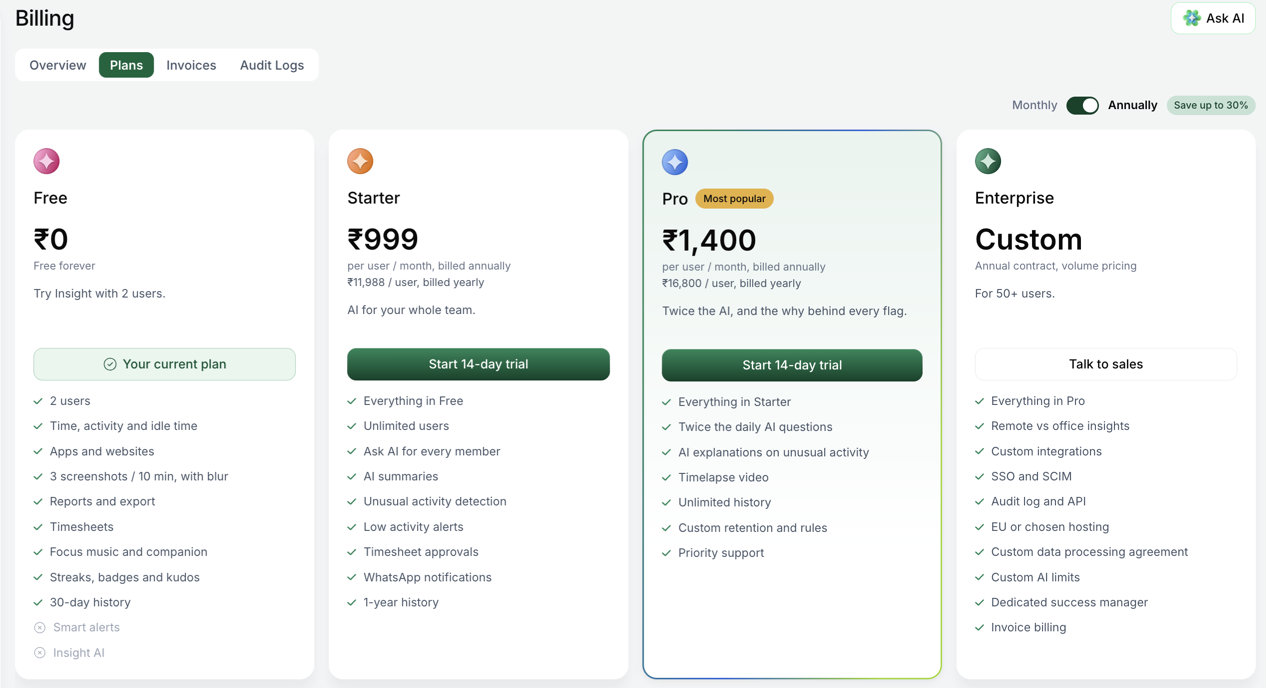
The free tier costs $0 for up to 2 users with 30 days of history. Starter is $9.99 per user per month, which is billed annually, or $14 monthly (₹999 or ₹1,400 in INR). Pro is $14 annually or $19.99 monthly (₹1,400 or ₹1,999 in INR), with no cap on users. The Enterprise tier is custom-priced for 50 or more users, and one usually has to talk to sales to get a custom plan that fits their needs.
Everyone you invite to use the monitoring software is considered a paid seat for all practical purposes, and this includes admins and managers. Teams in India automatically see and pay rupee prices, with GST shown on the invoice, so there is no exchange margin. Full plan details can be found in the Helpdesk.
| Seats | Starter, annual | Pro, annual | Pro, monthly |
|---|---|---|---|
| 10 | $99.90/month, $1,198.80/year | $140/month, $1,680/year | $199.90/month, $2,398.80/year |
| 50 | $499.50/month, $5,994/year | $700/month, $8,400/year | $999.50/month, $11,994/year |
| 200 | $1,998/month, $23,976/year | $2,800/month, $33,600/year | $3,998/month, $47,976/year |
In India, a 10-person team on Pro annual pays ₹14,000 a month, or ₹1,68,000 a year. Add 18% GST and the yearly bill is ₹1,98,240.
The Ask AI add-on is where the figures are likely to go wrong. This add-on is priced at $3 (₹299) per seat per month. Therefore, that 10-member team will pay an additional $30 each month (or $360 annually). In case you have a member leaving, deactivating them releases the seat immediately, but the pricing adjustments are only reflected at the time of renewal (in case of an annual pricing, at the end of the annual cycle).