Workforce Intelligence and Time Tracking Software Productive Employees Will Love
See how your team spends its day, what gets done, and who might need a hand.
Founding companies keep 50% off for life.
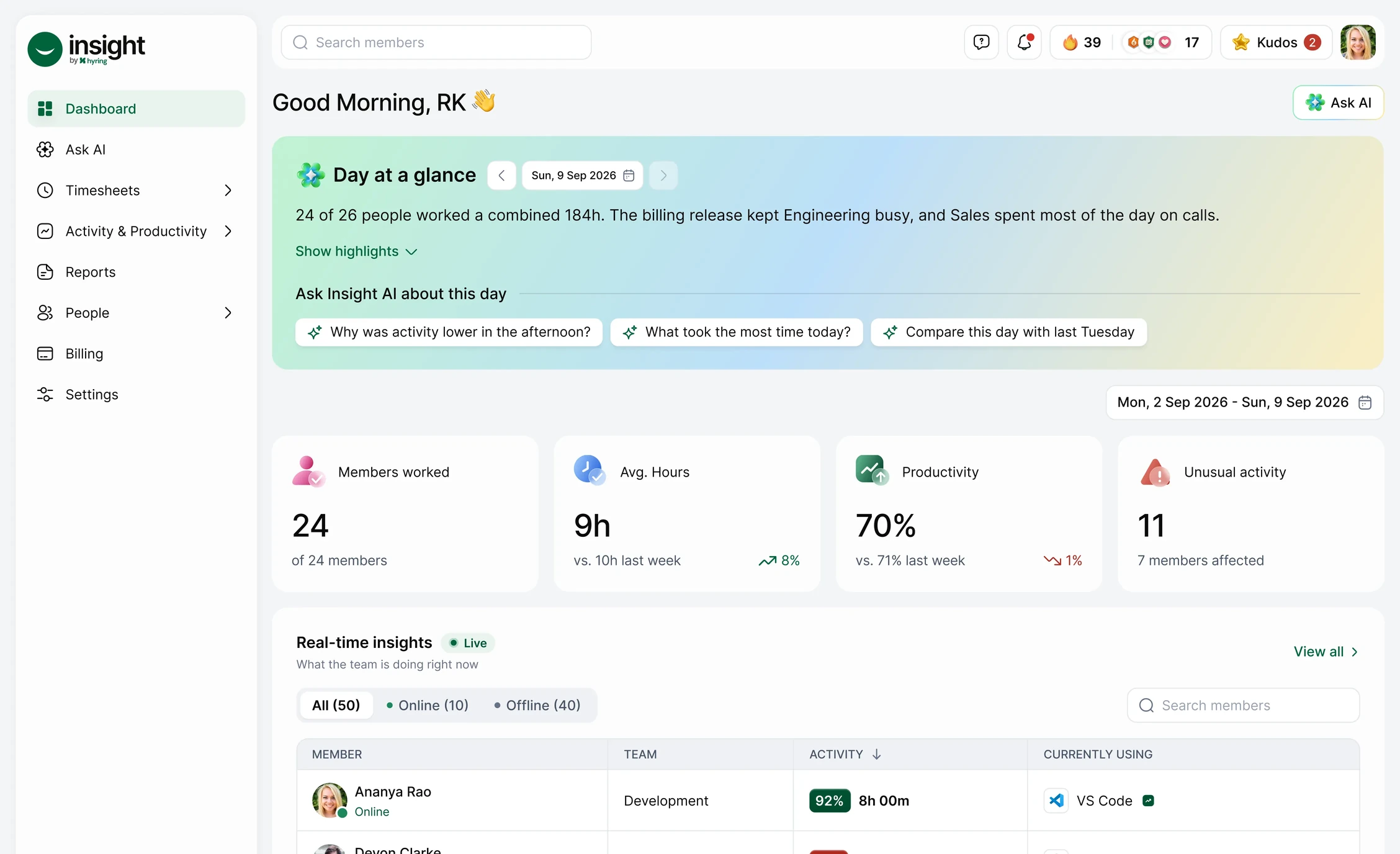
Everything Your Team Needs. In One Place.
ACTIVITY
This week: 82%
Kudos

24 this month
Focus music
Works with Spotify
Instrumental Flute
Playing now

Unusual Activity

Arun
Long keyboard activity with no mouse
Reddit42m

Kabir
Mouse moves without clicks
Facebook20m

Devon
Watching videos for long periods
Youtube1h 2m



Desktop app
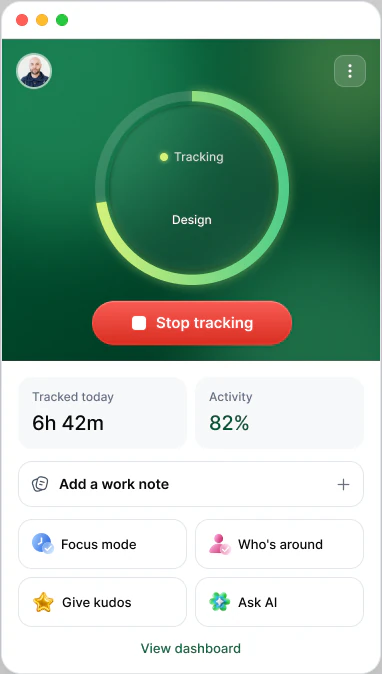
Reports: Time & Activity report, Mon 7 – Sun 13 Sep, 408h 30m. Export as PDF or CSV.
Streaks
39 days


Work location
Office 43%
Remote 57%
Your companion






Time for a water break💧

Ask AI
Who might need support?
Devon had 3 low-activity days.
A quick check-in could help.
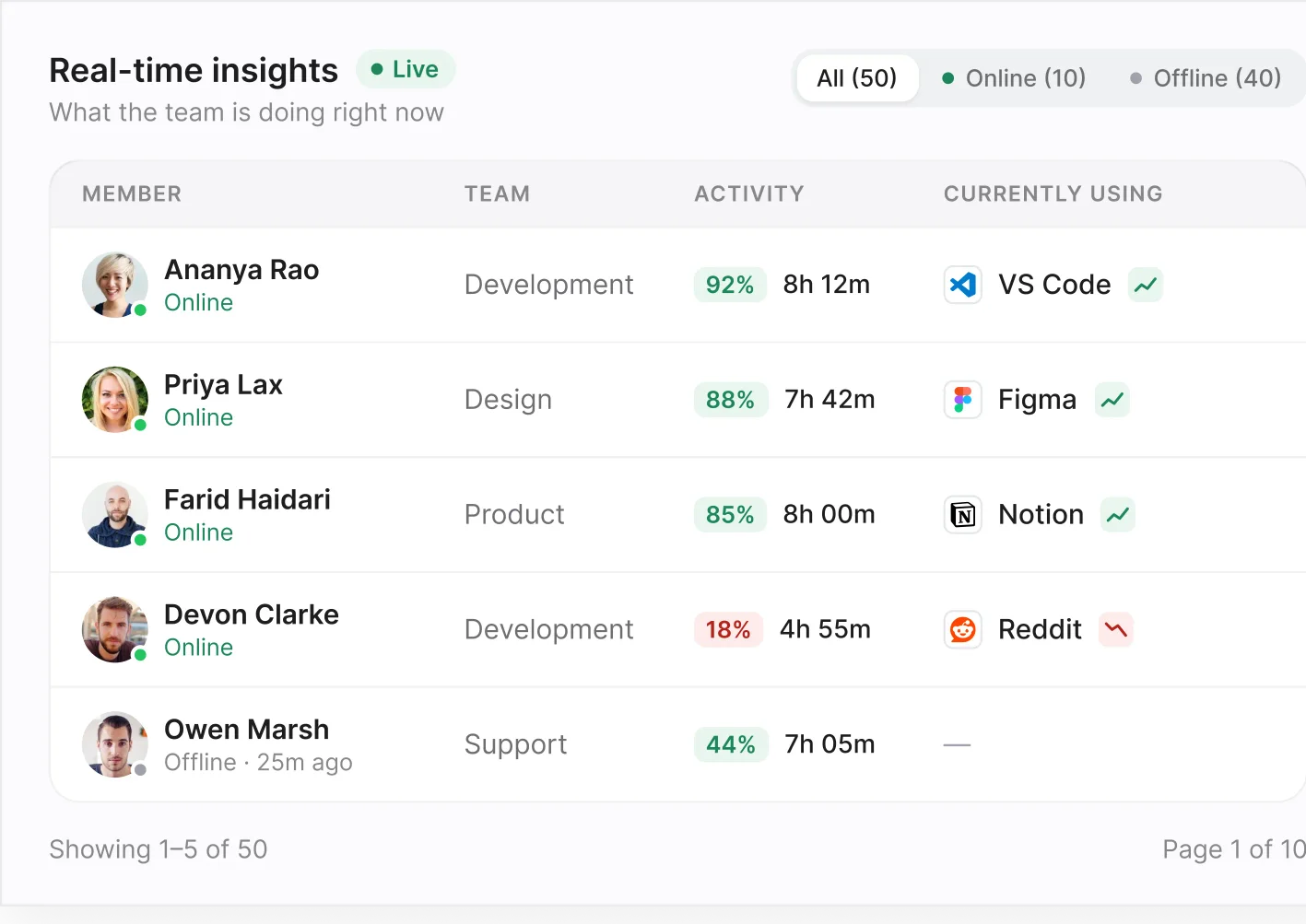
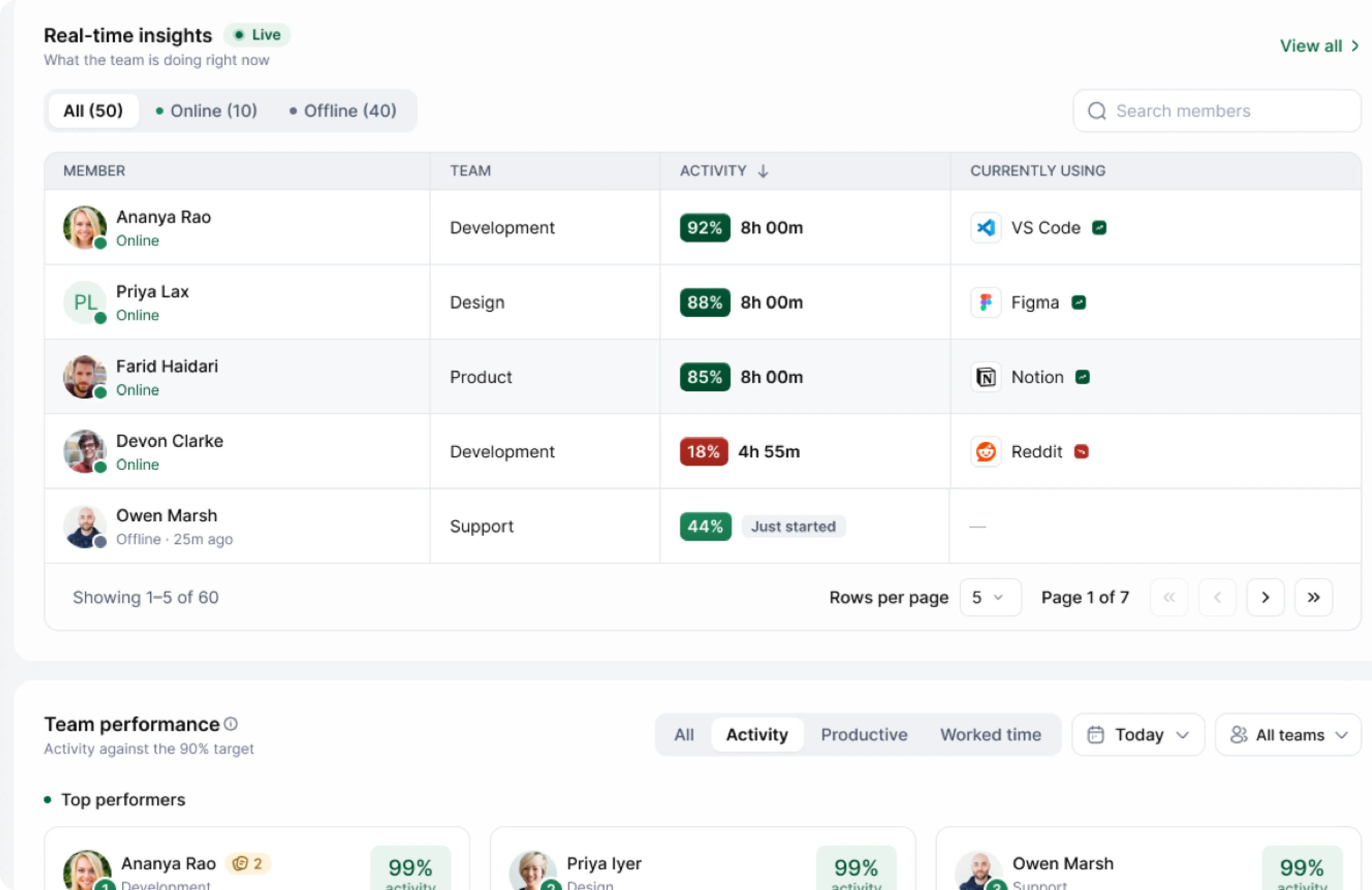
Real-time insights
Screenshots


Eight Hours on the Clock. Here's What Actually Happened.
The clock says
- One blockNo detail
Hyring Insights says
- Figma2h 10m
- Jira1h 20m
- Huddle1h 30m
- Slack40m
- Idle1h 30m
- Break50m
Hyring Insights breaks the day into the apps, meetings, focused work, and idle time that made it up.


Take a Look Around


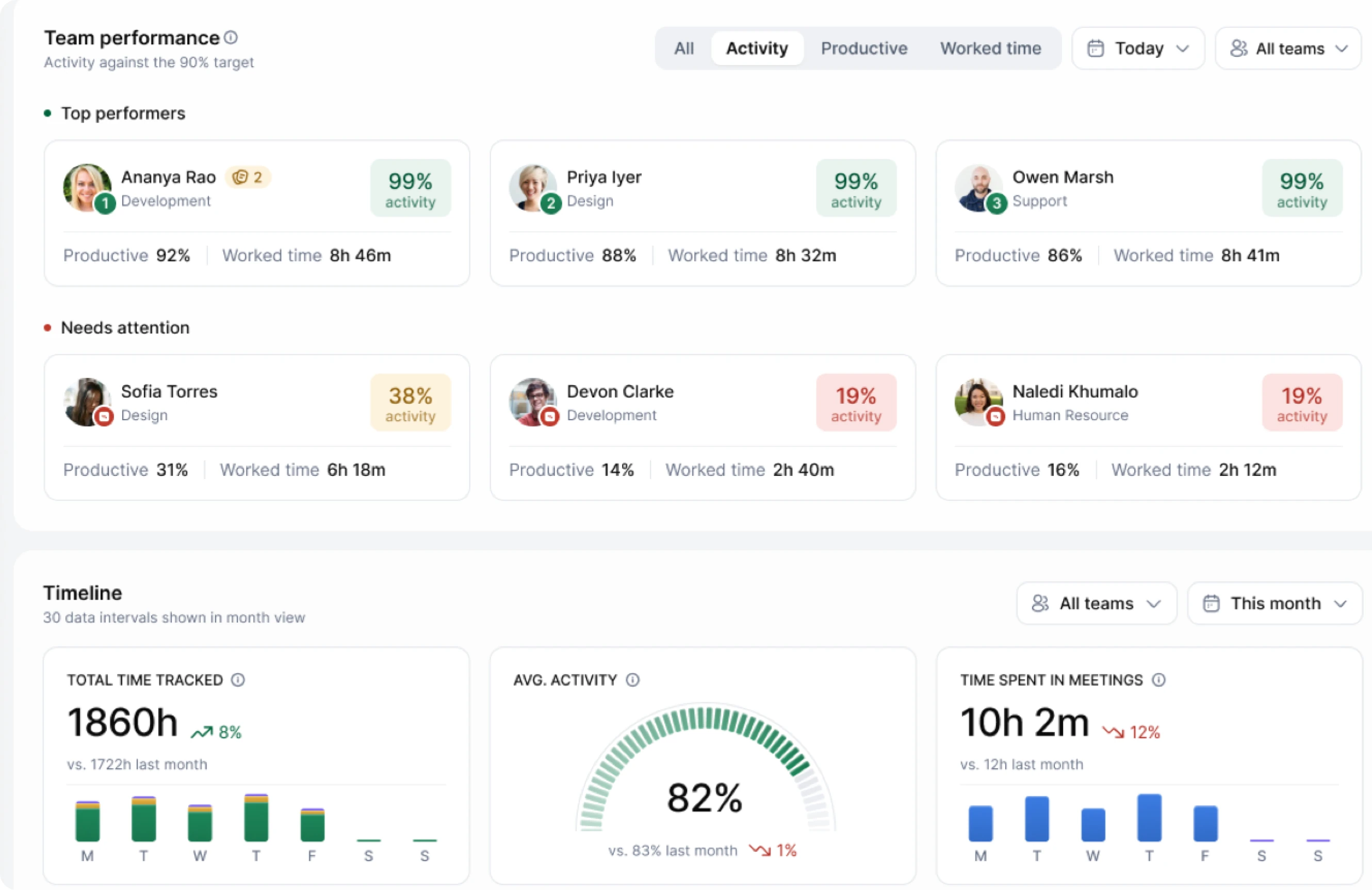

This week's key numbers, compared with last week.
See who's doing well and who could use support.
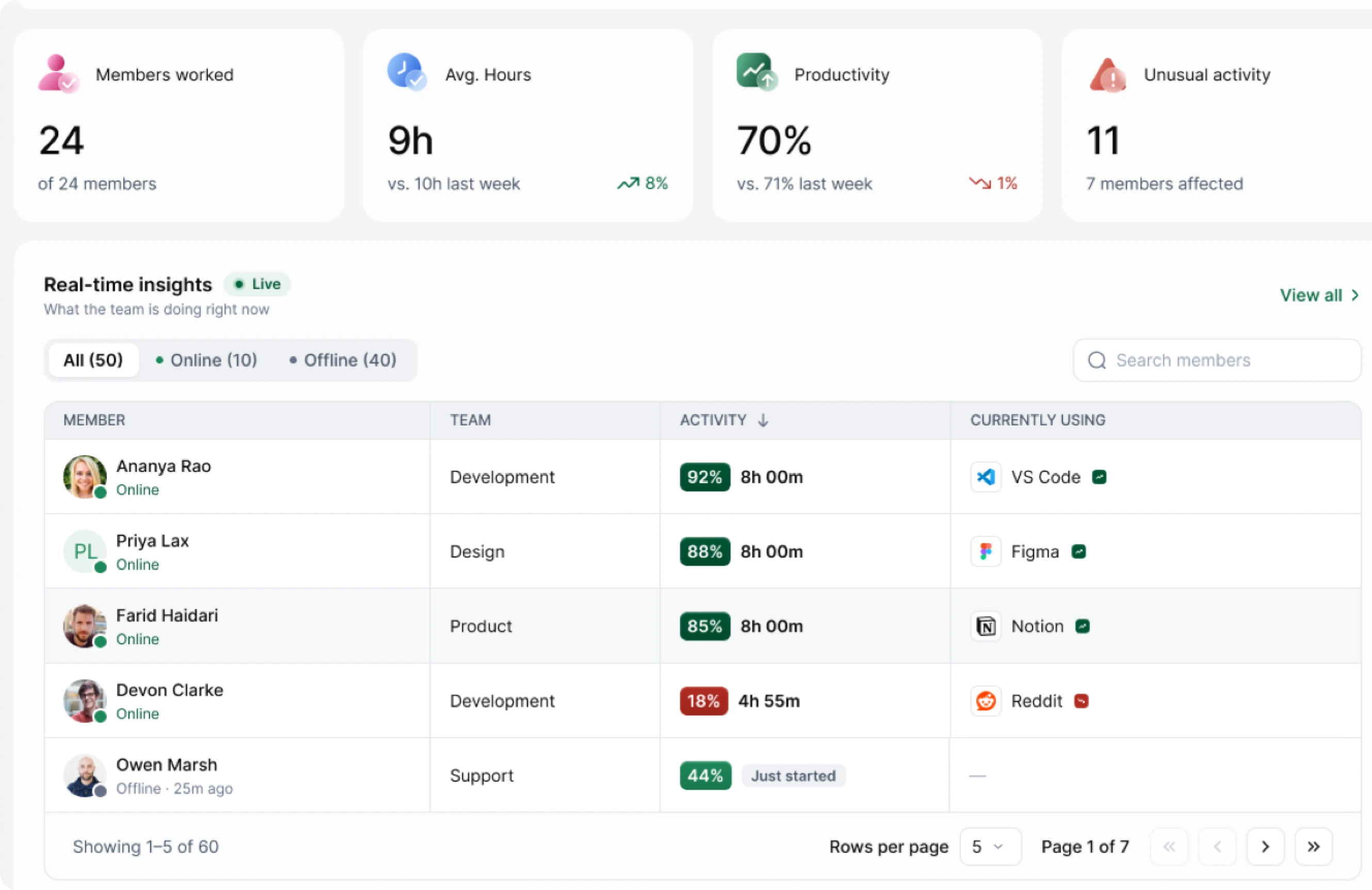
See who's online and which app they're in.
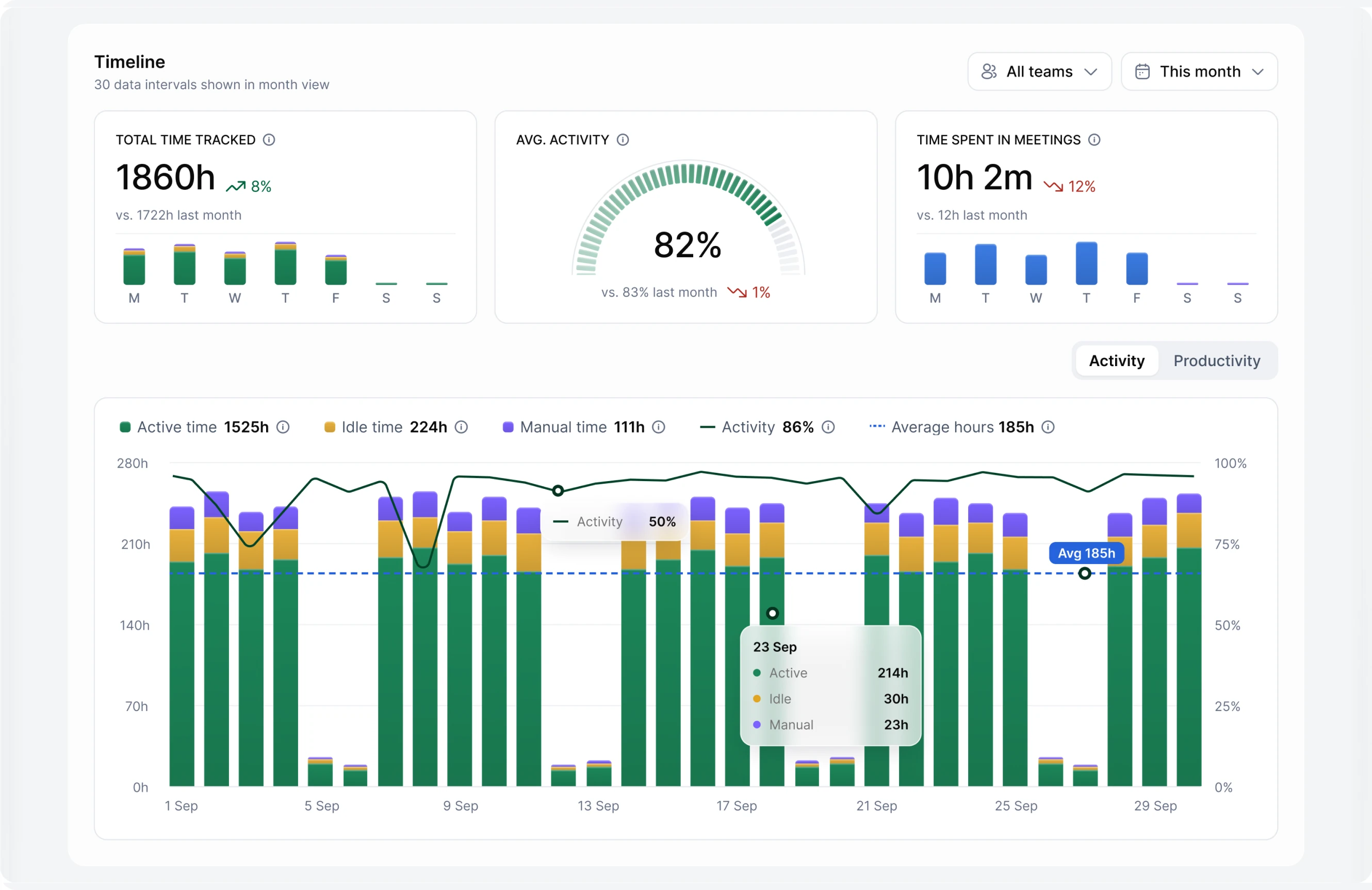
Active, idle, and manual time across the month.
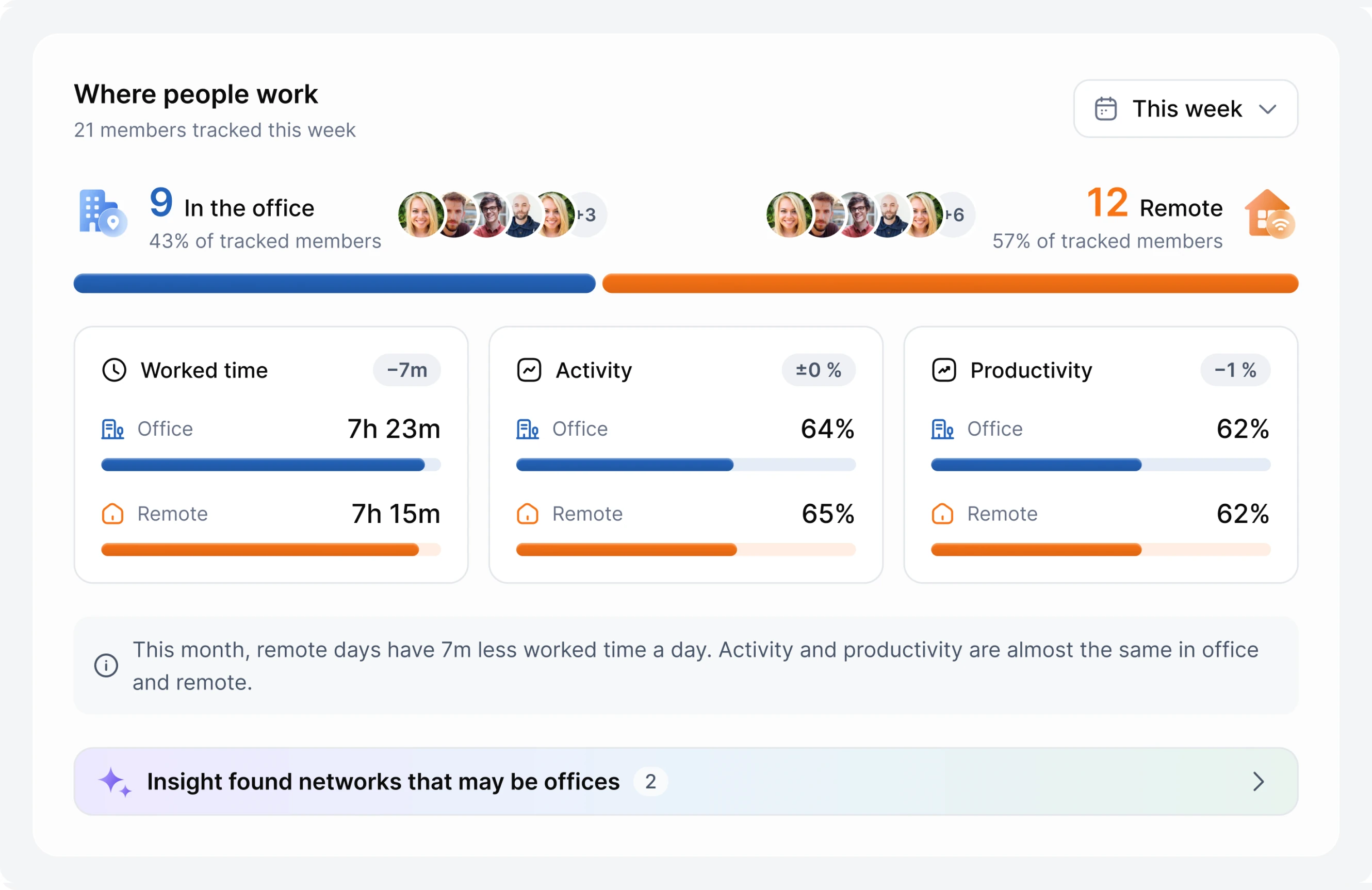
Compare office and remote days side by side.
Hours, activity, and productivity on office vs. remote days.
Find your team's most productive hours.
When the workday actually starts and ends in each setting.
A friendly avatar that keeps you company and cheers you on.
Reminders to drink water, stretch, and rest your eyes.
Keep a daily streak going. Weekends and holidays don't break it.
Thank a teammate with one tap.
We watch for seven patterns, like a mouse moving with no clicks or hours of streaming.
Each flag is a prompt to check in, nothing more.
See everyone's hours by day, week, or month.
Time worked offline gets logged with a reason, and managers approve it.
Productive and unproductive time for each day.
AI looks at what's on screen, so a YouTube tutorial counts as work and a YouTube binge doesn't.
Watch a full day of screenshots in a couple of minutes.
Taken with consent. You choose how often, and how long they're kept.
Each day split into active, idle, and manual time.
Clean reports for any team, person, or date range.
Raw data for your own spreadsheets.
Time, apps, and remote vs. office reports, all exportable.

Ask about your team
like you'd ask a colleague.
- Activity
- Timesheets
- Screenshots
- Apps & URLs
- Unusual activity
- Reports
- People
- Requests
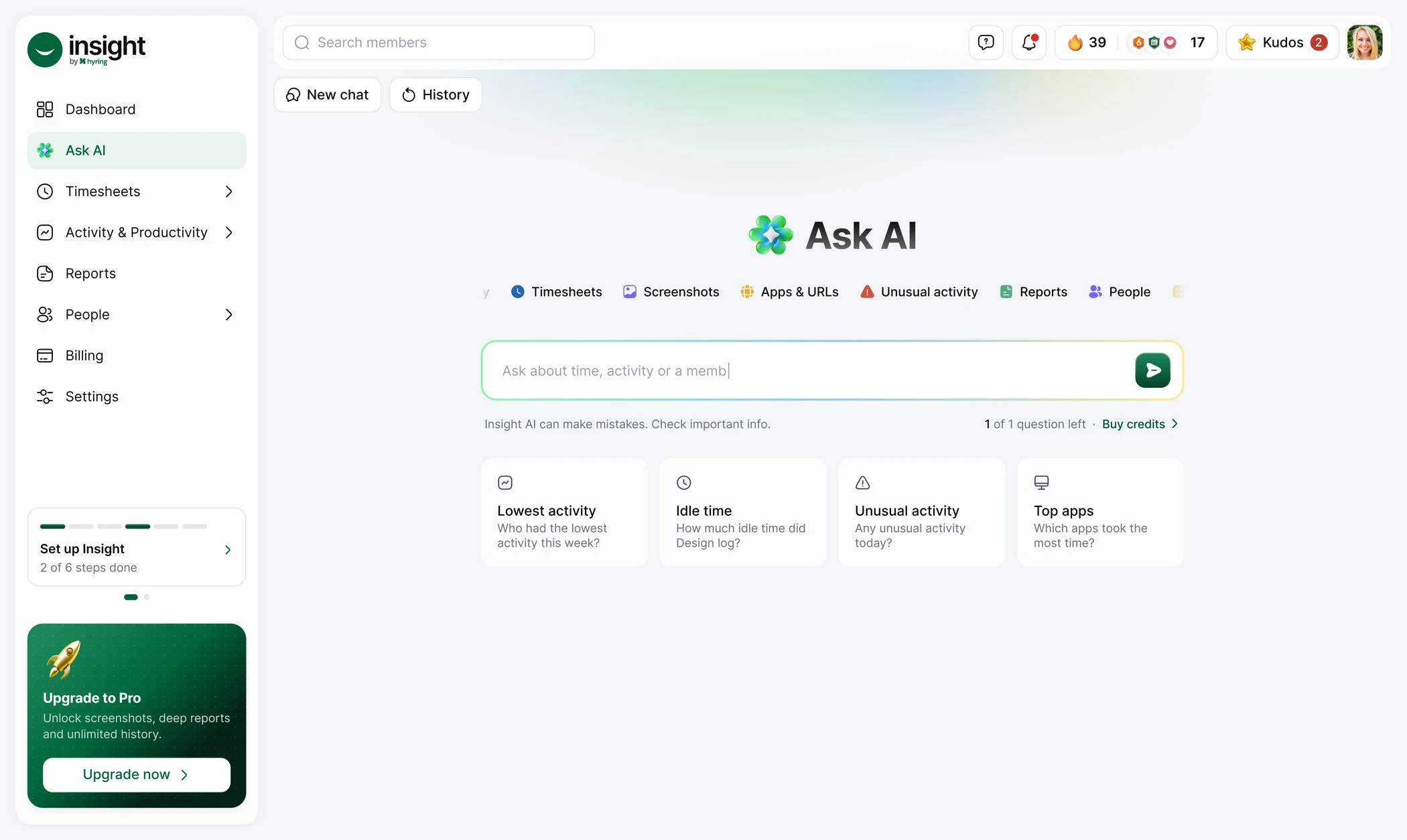
- Secondsto answer, faster than pulling a report
- Your datawith the numbers behind every answer
- Claude & Geminiask over MCP from the tools you use
How Hyring Insights Compares.
Here’s how we stack up against 19 popular time tracking and monitoring tools.
| Tool | Time tracking | Apps & URL tracking | Screenshots / recording | Productivity analytics | AI insights / Q&A | Unusual activity alerts | Timesheets & reports |
|---|---|---|---|---|---|---|---|
 Hyring Insights | Yes | Yes | Yes | Yes | Yes | Yes | Yes |
 Hubstaff | Yes | Yes | Yes | Yes | Partial | Yes | Yes |
 Time Doctor | Yes | Yes | Yes | Yes | Partial | Yes | Yes |
 Clockify | Yes | Yes | Partial | Yes | Not disclosed | Partial | Yes |
 Toggl Track | Yes | Partial | Not disclosed | Yes | Not disclosed | Not disclosed | Yes |









Partial means some related functionality is available, but the full Hyring Insights capability was not verified. Not disclosed means it was not clearly established in the sources reviewed; it does not necessarily mean the feature is unavailable. Based on publicly available information as of October 2026.
Start Free and Upgrade When You Need To.
Free for 2 users. No credit card required.
- 2 users
- Time, activity and idle time
- Apps and websites
- 3 screenshots / 10 min, with blur
- Reports and export
- Timesheets
- Focus music and companion
- Streaks, badges and kudos
- Employee notice builder
- 30-day history
- Not included: Smart alerts
- Not included: Insight AI
- Everything in Free
- Unlimited users
- AI bot for managers and admins
- AI summaries
- Unusual activity detection
- Low activity alerts
- Timesheet approvals
- WhatsApp notifications
- 1-year history
- Everything in Starter
- AI coach for every member
- Daily and weekly AI summaries
- Workspace-wide AI
- Weekly narrative reports
- AI explanations on unusual activity
- Timelapse video
- Unlimited history
- Custom retention and rules
- Priority support
- Everything in Pro
- Remote vs office insights
- Custom integrations
- SSO and SCIM
- Audit log and API
- EU or chosen hosting
- Custom data processing agreement
- Custom AI limits
- Dedicated success manager
- Invoice billing
 Free
 Starter
 Pro
 Enterprise
Download the desktop app.
Available for macOS, Windows, and Linux.

What Our Customers Say
Managers and employees on using Hyring Insights every day.
Transparency
Employee-centric and transparent.
“What I love most about Hyring Insights is how employee-centric it is. Everything feels transparent, and employees know what is being tracked and how their work is measured. It creates a sense of trust rather than making people feel constantly monitored.”
 Priya RamanHR Manager, Northwind Labs
Engagement
More than just time tracking.
“Hyring Insights is one of the most engaging time-tracking experiences I've seen. Features like kudos, streaks, and achievements make it more than just tracking hours. They make work feel rewarding and motivate employees to build better habits.”
 Arjun MehtaTeam Lead, Brightpath Studio
Visibility
Better visibility into work.
“It gives us a clearer picture of how our time is spent throughout the workday. Instead of relying on assumptions, we can use actual insights to understand work patterns and identify where improvements can be made.”
 Sarah CollinsOperations Head, Lumen Retail
AI insights
AI that makes insights accessible.
“The AI-powered insights make it easier to understand what's happening across the team without spending hours going through reports. Getting answers quickly helps managers make more informed decisions.”
 Daniel KimEngineering Manager, Quantix Systems
Outcomes
Focus on outcomes, not just hours.
“What stands out is the focus on understanding productivity rather than simply counting hours. It helps us look beyond time spent at the computer and have more meaningful conversations about work habits and performance.”
 Meera IyerProduct Manager, Bluewave Digital
Recognition
Recognition that brings teams together.
“Small gestures of recognition can make a big difference. Kudos give teammates a simple way to appreciate each other's efforts, helping create a more positive and supportive work environment.”
 Rahul VermaCustomer Success Lead, Zentro Logistics
Simplicity
Simple and easy to understand.
“I like how the important information is presented in a way that's easy to understand. I don't have to dig through complicated reports to get a sense of my workday. The experience feels straightforward and useful.”
 Emily CarterProduct Designer, Pixelnest Agency
Not Just Another Time Tracker.
Built for
 Hyring Insight: Built for both. Everyone sees their own data.
Typical tracker: Built for managers. Employees rarely see their data.
How work is judged
 Hyring Insight: Context. AI looks at what's on screen.
Typical tracker: Raw hours and activity counts.
Getting answers
 Hyring Insight: Ask a question and get an answer in seconds.
Typical tracker: Dig through reports and spreadsheets.
Unusual activity
 Hyring Insight: Flags that a manager reviews before deciding anything.
Typical tracker: Flags that can feel like verdicts.
For employees
 Hyring Insight: A companion, break reminders, streaks, and kudos.
Typical tracker: Little beyond the timer.
Fixing time
 Hyring Insight: Employees request changes with a reason, and managers approve.
Typical tracker: Edits made by hand, off the record.
Built for
Typical time trackers: Built for managers. Employees rarely see their data.
Hyring Insight: Built for both. Everyone sees their own data.
How work is judged
Typical time trackers: Raw hours and activity counts.
Hyring Insight: Context. AI looks at what's on screen.
Getting answers
Typical time trackers: Dig through reports and spreadsheets.
Hyring Insight: Ask a question and get an answer in seconds.
Unusual activity
Typical time trackers: Flags that can feel like verdicts.
Hyring Insight: Flags that a manager reviews before deciding anything.
For employees
Typical time trackers: Little beyond the timer.
Hyring Insight: A companion, break reminders, streaks, and kudos.
Fixing time
Typical time trackers: Edits made by hand, off the record.
Hyring Insight: Employees request changes with a reason, and managers approve.
Comparison reflects how time trackers typically work as a category.
Questions? Answers.
It's workforce intelligence and time tracking software. It tracks how time is spent and helps managers make sense of it.

See How Your Team
Really Works.
Free for 2 users, and most teams are set up the same day. No credit card.
- Free forever for 2 users
- 14-day trial on Starter and Pro