Scoring is typically not applicable for general questions.
General questions are designed to assess broader competencies and may not be scored like technical questions.
However, for technical questions, scoring is based on Hyring AI’s algorithms, the job description, relevant keywords, and custom prompts.
This scoring system ensures a precise evaluation of candidates’ technical abilities and alignment with the job requirements.
Steps to Enable Scoring for General Questions:
Select the General Question & Turn On Scoring:
Choose the general question you want to apply scoring to. By default, scoring is off. Click to switch it on.

Customize the Scoring Criteria:
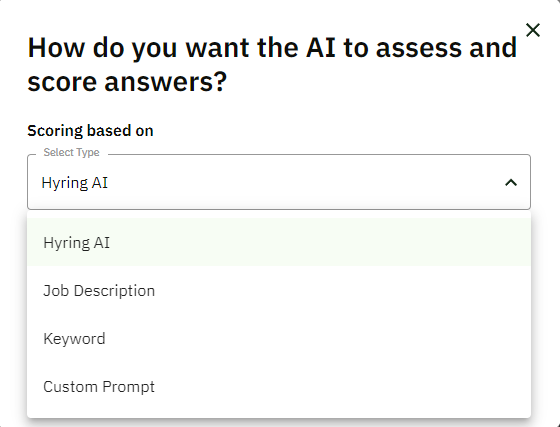
Hyring’s AI (Default): Scores based on general scenarios.
Job Description: Scores based on criteria outlined in the JD.
Keyword: Include specific keywords, and the AI will score answers based on the presence of these keywords.
Customized Prompt: Provide a conditional prompt for more specific judging criteria.
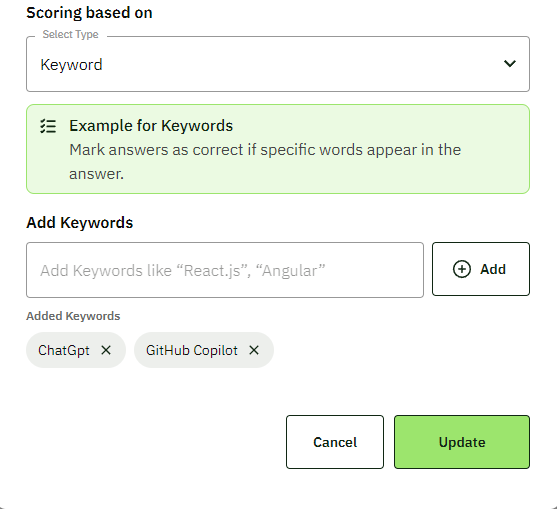
For example, let us set up Keyword Scoring:
I chose the Keyword option.
Enter relevant keywords (e.g., "ChatGpt" and "GitHub Copilot").
Click Update to apply these settings.
Verify Scoring Application:
Scoring is now active. Candidates' responses will be evaluated based on the selected criteria, and those meeting the judgment standards will receive a good score.

With this setup, you can tailor the scoring to fit your specific needs, ensuring a more precise evaluation of candidates' answers.

