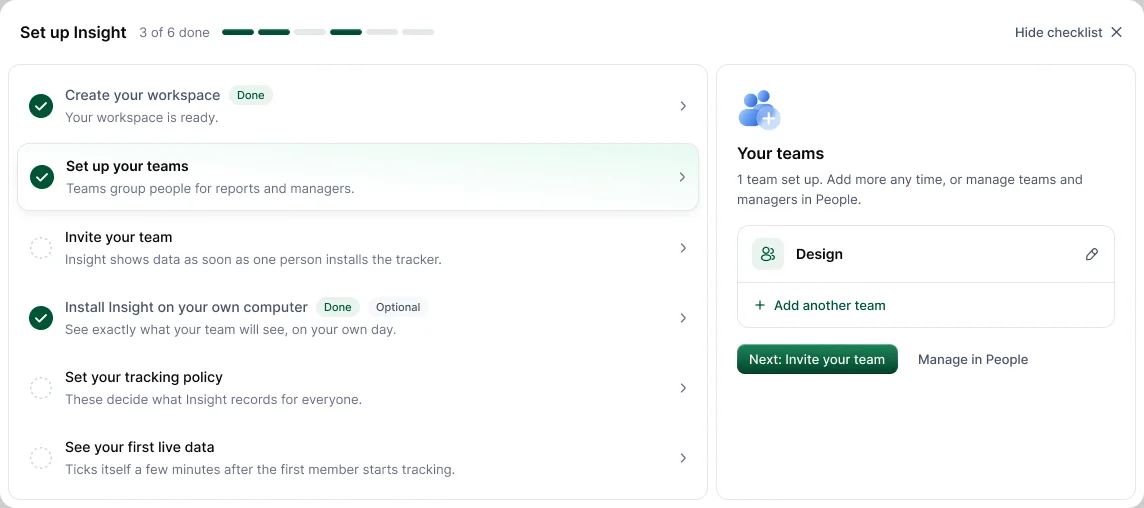
Most workspaces can be set up in under an hour. The Set up Hyring Insight checklist on your Dashboard walks you through it and ticks itself off as you go.
- Create your workspace at insight.hyring.com/signup. It starts on a 14-day free trial, or on Free if you choose it.
- Set up your teams so managers see the right people. See How do I create teams and assign managers?.
- Invite your team from People. See How do I invite people to Hyring Insight?.
- Install Hyring Insight on your own computer. It's optional, but it helps you see what your team sees.
- Set your tracking policy in Settings: working days and hours, idle detection, app and URL tracking, screenshots and blur.
- Check your first live data once the first person starts tracking.
Before people install, tell everyone what's recorded. See How do I tell my team about Hyring Insight before it starts?.
Recommended settings for most companies
| Setting | Where | Recommended |
|---|---|---|
| Work schedule | Settings › General › Working preferences | Your real working days and hours |
| Idle timeout popup | Settings › Tracking & monitoring › Idle detection | Around 10 minutes |
| Screenshot privacy | Settings › Tracking & monitoring › Screenshots | Blur for selected members, at least for sensitive roles |
| Manual time | Settings › Time & productivity › Manual time | Require reason and Require approval on |